Document Reader-PDF Launcher
- 3.3
- Rating
- 100.00K
- Installs
- Free
- Price
 Analysis by App-foxy
When I need to open a PDF quickly on an Android phone, I usually want a tool that stays out of my way. Document Reader-PDF Launcher takes that straightforward approach: it is a free document-reading app from AOOFAN LIMITED, built for Android devices running version ten or later. I tested it with the mindset of someone who receives documents during the day and wants to read them without turning the phone into a full office workstation.
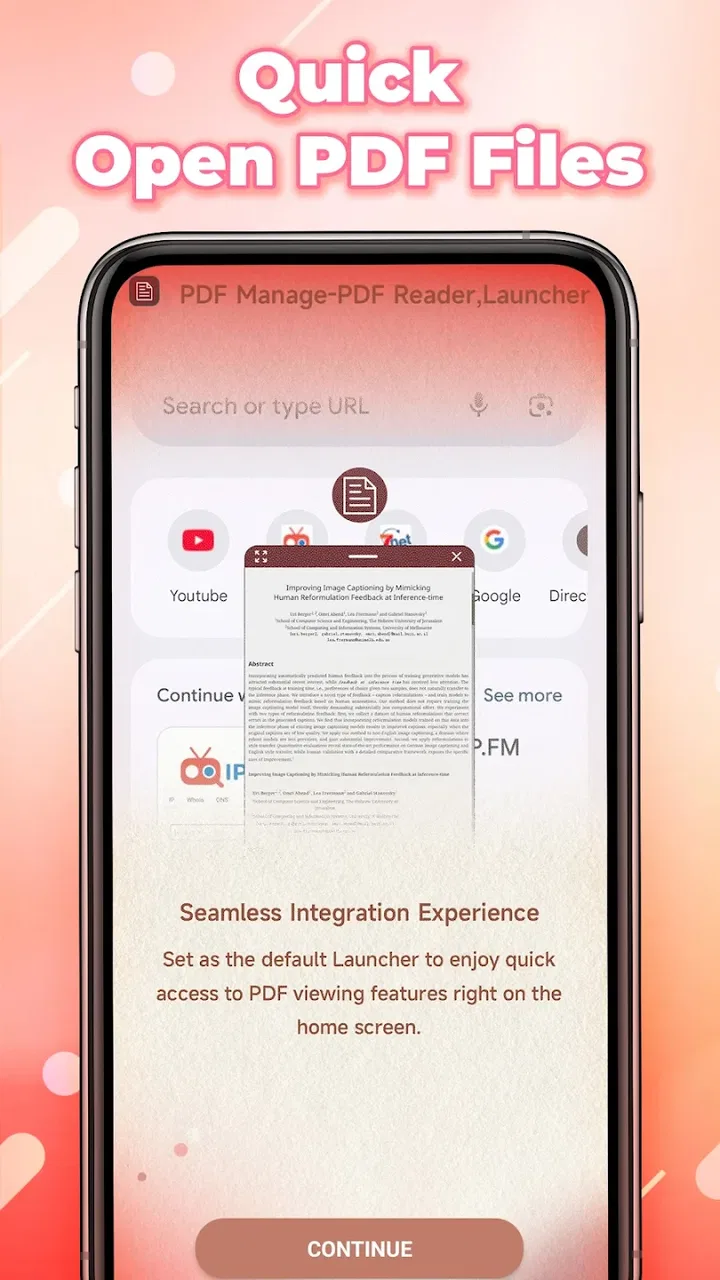
The app sits in the tools category, and that description fits better than calling it a complete document suite. Its store summary presents it as a PDF tool designed specifically for Android, while the short description simply calls it “Document Reader.” That modest positioning matters. I would look at this app for opening and reading PDF files, not as a replacement for a desktop editor, cloud-storage platform, or full productivity package.
Its current version is 1.0, and the app was released on January 23, 2026. The public response is mixed, with an average rating of 3.3 from around 441 ratings and 79 written reviews. It has passed the 100K+ install mark, which suggests that enough Android users are trying it to make the early feedback worth considering. It is rated for Everyone, so its intended audience is broad.
You May Also Like

 Blood Strike: 2.5 Anniversary
Blood Strike’s Loadouts Turn Every Drop Into a Tactical Gamble
A close look at Blood Strike’s custom loadouts: how fast access to signature weapons reshapes its battle royale rhythm, rewards preparation, and narrows the gap between fights.

 Pandora - Music & Podcasts
Pandora’s Music Is Easy to Start, but Harder to Recover
Pandora’s strength is its low-effort path from a seed to a station. Its weak spot is how much confidence it asks you to place in connection, setup, and quiet recovery.

 8 Ball Pool
 Is Built on Rivalries, Rematches, and Routine
A close look at the rivalries, rematches, shared routines, and unanswered safety questions that turn a quick pool match into a persistent mobile community.

 Samsung Music
’s Quiet Strength Is Playing What You Already Own
Its reach comes less from spectacle than from dependable access to a personal library. That simplicity is both the app’s strongest retention engine and its ceiling.

 AccuWeather: Weather Radar
AccuWeather Review: A Quick, Clear Forecast for Everyday Decisions
For everyday plans, the best forecast is the one you can understand quickly. AccuWeather makes rain timing, radar, and local conditions easy to act on, with a few trade-offs.

 Hill Climb Racing
Why Hill Climb Racing Still Turns Crashes Into One More Run
A tiny car, a bumpy hill and one more upgrade: Hill Climb Racing keeps resurfacing because its simple chaos makes every near-miss feel personal.
More From Our News Desk
View All News


How connectivity changes the reading experience
I find it helpful to separate getting a PDF onto my phone from reading it once it is there. That distinction makes everyday troubleshooting easier and helps me decide when a dedicated reader is the right next step. From there, I can look at how the document moves between the source app, local storage, and the screen where I need it.
Opening a document is not the same as finding one
The most important distinction I noticed is between the reader itself and the route used to obtain a document. If a PDF is already available on the phone, the main task is simple: locate it, open it, and read. If the file is still in an email, a messaging conversation, or an online storage service, connectivity becomes part of the workflow before the reader even gets involved.
That makes this app more useful in some situations than others. A downloaded travel confirmation, a saved instruction manual, or a PDF received earlier can be ready when I need it. By contrast, trying to retrieve a document while moving through a weak signal area depends on the source application and the connection, not just on the reader. I would therefore prepare important files before leaving home rather than assuming that every document will be immediately available.
This is a practical point that is easy to overlook. A PDF reader can feel unreliable when the real problem is that the file has not reached the device yet. With this app, I would separate those two stages: obtain the document while the connection is stable, then use the reader for the actual viewing.
A realistic day-to-day example
Imagine receiving a building access form in a work chat while commuting. If the file downloads successfully, a lightweight reader is useful for checking the pages, confirming that the right document arrived, and reviewing the instructions before reaching the destination. If the chat app cannot download the attachment because the signal drops, opening the reader repeatedly will not solve the underlying issue.
That workflow also explains why I would not judge the app only by how quickly it launches. The useful question is whether it fits the moment when I need it. For a document already stored locally, it can be a sensible first choice. For a file that lives inside a complicated online workflow, the original service may still be the better starting point.
Mobile reading needs a different kind of simplicity
Phone screens are restrictive, especially with forms, receipts, manuals, and multi-column documents. I found that a reader is most valuable when it helps me move through a file without forcing me to perform unnecessary actions. On mobile, I tend to read in short sessions: standing in a queue, checking a page before a meeting, or confirming a reference while away from a desk.
That is where the app’s narrow purpose works in its favor. I do not expect a tool like this to replace a large-screen PDF editor. Instead, I see it as a convenient doorway into documents when carrying a laptop would be excessive. The trade-off is that detailed reading, comparing pages side by side, or working with dense layouts remains more comfortable on a tablet or computer.
My advice is to judge the app by the size and urgency of your documents. It makes more sense for quick review than for long technical reading. If you mainly need to confirm a page, check a number, or read a short notice, a phone-based reader is practical. If you regularly annotate lengthy reports, reorganize pages, or edit forms, you will probably want a more specialized application.
What I would prepare before going mobile
For important trips, I would open each needed PDF once before leaving a reliable connection. I would also keep filenames understandable instead of relying on a long chain of generic downloads. That small habit saves time because the reader can only help after I have identified the correct file.
A second useful habit is to test the document at the same screen size I expect to use later. A PDF that looks clear on a desktop monitor may require more zooming on a phone. Checking it in advance reveals whether the text is comfortable enough for a quick mobile session or whether I should bring another device.
These are not glamorous features, but they are the kinds of details that determine whether a document tool feels dependable. The app’s value comes from reducing friction at the reading stage, while preparation handles the problems that occur before reading begins.
When a connection fails
Connectivity problems are most frustrating when they happen at the exact moment a document matters. A user may tap an attachment, wait for it to load, and then assume the reader has failed. In practice, several parts of the chain can be involved: the network, the source app, the file transfer, the phone’s storage, and finally the reader.
My recovery approach would be deliberately simple. First, I would check whether the document is already present in the device’s files. If it is, I would open that local copy rather than retrying the original online attachment. If it is not, I would wait for a stable connection and download it again through the source service. Only after confirming that the file is actually on the phone would I treat a reading problem as an issue with this app.
This separation makes troubleshooting much faster. It also prevents a common mistake: repeatedly launching a PDF reader when the document itself has not completed its download. A focused reader cannot substitute for a file manager or a network connection.
Handling the wrong file or an incomplete download
Another everyday problem is opening a document that looks correct by name but is not the intended version. I would check the filename and, when possible, the first page before relying on its contents. This is especially important for forms and work documents where several revisions may share nearly identical names.
If a file behaves strangely, I would obtain a fresh copy from the original source rather than assuming that changing readers will repair it. An interrupted transfer can produce a document that is present but unusable. Re-downloading over a dependable connection is usually a cleaner recovery step than repeatedly forcing the same copy to open.
The app is therefore best understood as one part of a document workflow. It can be the final viewing step, but it does not eliminate the need for sensible file handling. Users who want one application to fetch, organize, edit, sign, and distribute every document may find this narrow role limiting.
Using it without wasting mobile data
PDF files vary greatly in size. A text-only notice may be easy to retrieve, while a scanned manual with many images can consume much more mobile data. Since the app is intended for Android document reading, I would avoid downloading large files repeatedly over cellular service when a stable Wi-Fi connection is available.
The most efficient routine is to collect the documents I expect to need before travelling, then read those prepared copies during the day. I would also avoid reopening the same attachment through several different apps, because each service may handle its own download process. Keeping one usable copy in a known location reduces both confusion and unnecessary transfers.
For people with limited data plans, this preparation is more important than searching for a reader with a longer feature list. The reader is only one stage of consumption; the source and download behavior often determine the real data cost. A simple local-reading routine can make the overall experience feel much more predictable.
Where this app fits beside familiar alternatives
Android users already have several ways to view PDFs. A browser may open a document immediately, a cloud-storage app may include its own preview, and office suites often combine reading with editing and sharing. Those alternatives are convenient when the file is already tied to a web page or a storage account.
I see Document Reader-PDF Launcher as a more focused option for someone who wants a dedicated document entry point rather than a large productivity bundle. The advantage is clarity of purpose: I am opening a tool for PDF reading, not navigating through unrelated editing, spreadsheet, or collaboration features. The disadvantage is that users who need those extra functions may end up switching applications anyway.
There is also a connectivity trade-off. A browser or cloud app may be better when documents are mainly accessed online and constantly change. A dedicated reader makes more sense when I already have the file and want a direct mobile reading experience. Neither approach is universally better; the right choice depends on whether my priority is online retrieval or uncomplicated document viewing.
Who should choose it, and who should skip it
I would recommend trying this app if you use an Android phone, regularly receive PDFs, and prefer a separate tool for opening documents. It is especially suitable for quick checks: reading a confirmation, reviewing a short guide, checking a form, or looking through a saved reference while away from a computer.
I would be more cautious if your main requirement is document creation or editing. The app’s positioning as a reader does not suggest a complete office workflow, so users who need signatures, advanced annotations, page rearrangement, conversion, or collaborative review should compare it with a broader PDF suite before settling on it.
I would also skip it as a primary solution if nearly all my documents remain inside a cloud platform and I rarely save files locally. In that case, the cloud service’s built-in preview may involve fewer steps. The dedicated reader becomes more attractive when I want a consistent place to open files that are already on the device.
What the early public response tells me
The combination of an average 3.3 rating and more than 100K+ installs gives the app a mixed but useful early profile. The install figure shows that it has reached a meaningful audience, while the rating suggests that convenience alone will not guarantee a perfect experience for everyone. Because the current version is 1.0, I would approach it as a young tool rather than a mature document platform.
That does not make it a poor choice. It simply changes how I would use it. I would install it for a specific reading need, test it with the kinds of PDFs I actually receive, and keep another familiar option available if a document is urgent. The Everyone age rating and free price make that trial relatively easy for general Android users.
My connectivity verdict
Document Reader-PDF Launcher works best when the network has already done its job and the PDF is ready to read. I like the idea of a focused Android tool for quick document access, particularly for people who do not want a full office suite just to open a file. Its strongest use case is prepared, everyday reading rather than complex online document management.
The main limitation is not necessarily the act of opening a PDF; it is the dependence on the surrounding workflow when the file is still online, incomplete, or difficult to locate. Preparing documents in advance, keeping clear filenames, and distinguishing download failures from reading failures will make the experience much smoother.
My final recommendation is measured: give it a try if you want a free, straightforward PDF reader for Android and your needs are mostly about viewing. Choose a broader alternative if you need editing, signing, collaboration, or tightly integrated cloud access. For short mobile reading sessions, the best results come from treating connectivity as preparation and the app as the final reading step.
As a first release from AOOFAN LIMITED, it has a clear purpose and a low barrier to testing. I would not make it the only document tool on a demanding work phone yet, but I can see its appeal for everyday users who simply want to open a PDF without carrying a larger productivity suite into every task.
FAQs for Document Reader-PDF Launcher
01What file formats can Document Reader-PDF Launcher open?
Document Reader-PDF Launcher supports a wide array of file formats, including PDF, DOC, DOCX, XLS, XLSX, PPT, PPTX, and TXT. This versatility allows users to view and manage different types of documents without the need for additional apps, making it an all-in-one solution for document handling.
02Is Document Reader-PDF Launcher free to use?
The app offers a free version with basic features, allowing users to open and read various document types. However, for advanced functionalities such as editing, conversion, and cloud integration, a premium version is available. This paid version enhances user experience by providing additional tools and removing ads.
03Does Document Reader-PDF Launcher require an internet connection?
Document Reader-PDF Launcher can open and view documents offline, making it convenient for users who need to access files without internet access. However, features like cloud storage integration and online file conversion require an active internet connection to function properly.
04How user-friendly is Document Reader-PDF Launcher for beginners?
The app is designed with a clean and intuitive interface, making it accessible even for those who are not tech-savvy. New users will find the navigation straightforward, with clear icons and simple instructions, enabling them to access documents and utilize app features with ease.
05Can I edit documents within Document Reader-PDF Launcher?
The app allows basic editing capabilities such as annotating PDFs and making simple text changes. For more extensive editing features, users may need to upgrade to the premium version. This version offers enhanced editing tools, including document conversion and advanced annotation features.
Pros
- Supports multiple file formats.
- Easy navigation with a user-friendly interface.
- Quick file search and organization.
- Offline access to documents.
- Regular updates with new features.
Cons
- Contains in-app advertisements.
- Limited editing features for documents.
- Some features require premium access.
- Occasional bugs in certain file types.
- Sync issues with large files.

Document Reader-PDF Launcher
Gallery